Unlock For Us

[Help] How to Get your Blogger Feed-ID (Blog-ID)

post

When it comes to Blogging especially for startup publishers, you need to read and research as many as you can. Don't just copy what others do. Think Deep.

Anyway, here's a request from my friend that just started blogging.

When installing Windows Live Writer, it may ask for the "<feed-id>". Getting the Feed ID upon installation is very difficult for beginners.

How? If I recall correctly, I already said this, here But I'll do it in a purely step-by-step beginners style method.

1. Login to your blogger account

2. Just point the mouse cursor to Posts link and copy the numbers after  "blogid=..."  You can do it also in settings and layout.

3. I know, It's difficult to memorize. so just click the Posts link and just copy in the address bar. That's it!

feed id

Enjoy Blogging!

More: Windows Live Writer Basics

USEFUL Windows Live Writer: File Upload Failed


Read more...

Unlock For Us

TweakUI for Vista? [WinBubble]

windows Many users actually sent an email and gave a deep appreciation for making a program like WinBubbles. Anyway, I would like to thank everybody for providing a good feedbacks and comments about the program. If you want to download WinBubble 1.76, I suggest to read first the new features of the program. TweakUI for Vista?

Last February 7, 2008, my idol book writer author said from his experiment that WinBubble is the Best Free TweakUI Replacement For Vista and Also, my idol Paul Thurrott in Twit.tv - Windows Weekly amazingly said the same observations last May 11, 2008.

"If you're looking for a TweakUI replacement for Windows Vista, there are several contenders, but the one that's closest in spirit and functionality is, I believe, WinBubble, a freeware application by Lawrence Albert"

Like I said to other Communities and friends around the world. I will not say or declare WinBubble as the New TweakUI for Vista. I will leave it to the great authors, respectable writers around the world to declare that honor and name.

Again, I would like to thank everybody for giving a good comments and suggestion for more development of the program. I'm sorry if I said lately that I will slow-down the development but now I changed my mind.

I will develop WinBubble more Not just for the Geeks But for All the people that doesn't stop supporting my program. WinBubble will always be a Free Vista Tweaker and Customization program for Windows Vista and the incoming Windows 7.

Great Thanks Guys!!!


Read more...

Unlock For Us

Setting the Ownership Of File or Folder to the Current User

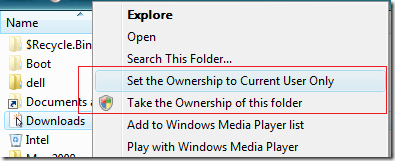
CurrentUserOnly

You cannot open any folder without proper privilege or permission because you'll get "Access is denied". If you recursively take the ownership of those folders, by either adding it manually or Download WinBubble to add "Take the Ownership of this Folder/File" to your Context Menu/Right-Click Menu, It Solves the Problem easily But One thing I noticed:

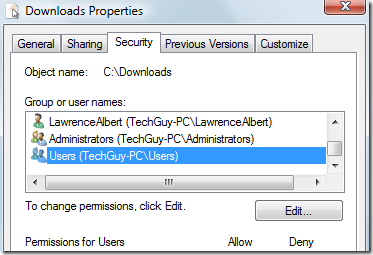
We are adding and allowing users to have an access to the folder.

securityproperty 

Nifty Solution(s):

READ THIS FIRST: Notes Before Taking the Ownership of File and Folder

Solution 1: As shown in the picture above, Use the new version WinBubble 1.74 to add the Context Menu:

Open WinBubble > Click "Set the Ownership to Current User Only" > Click the Apply Button. That's it!

Solution 2: Use the command below:

a. Open the command prompt as administrator, Start Menu Search > type cmd > Press CTRL+SHIFT and Enter Key

b. Lastly, Use the Syntax Below:

ECHO Y| cacls "[Folder/file]" /T /G %username%:F

Solution 3: One by one:

cacls "[Folder/file]" /T /G %username%:F

Confirm by answering YES: Y

Solution 4:

a. Manually Take the Ownership of the folder/file

b. Right-Click Properties > go to Security Tab > Click the Advanced Button > Click the Edit Button > Uncheck "Include inheritable permissions from this object's parent" and finally, Choose the Users that you want to remove and Click the Delete Button

What's the Benefit of this?

  1. This will recursively take the ownership of the folder but only the Current User will have the permission to enter and open the folder. Other Administrators, They can access the folder if they change or take the ownership of the folder.
  2. Folder Security: It can add a security to your computer that only the current logon user can access the folder unless a correct Administrator password is entered by the Standard user.
  3. If your brother account got infected by a virus. Your files are safe against the virus infection.


Read more...

The Ultimate Tweaking Toolbox Update

TweakingToolBox

If you downloaded or learn about any ultimate Registry Tweaks to optimize and customize your Windows Vista, useful freeware application but you do not use it frequently, your desktop is full of icons and also, you don't want to memorize lots of commands. WinBubble Toolbox Update is great for you! Now supports .reg, .bat, .vbs, .exe and ANY FILES that can be launch through Windows Explorer. Download WinBubble Now!

TweakingToolBox2

Even your Picture!!! :)

This is the reason why WinBubble 1.74 was delayed... A fully functional tweaker that suited to all kinds of people. Beginner, Intermediate and Advanced.

For more examples about Tweaking Toolbox. Read here:

WinBubble: The Tweaking Toolbox


For Complete Documentation of WinBubble, here:

Documentation:

Unlocking WinBubble Part 1 Tips and Tweaks

Unlocking WinBubble Part 2 Icon Customizations

Unlocking WinBubble Part 3 Securing your desktop

Unlocking WinBubble Part 4 Screensaver Customizations

Unlocking WinBubble Part 5 Optimize your Windows Vista Experience

Unlocking WinBubble Part 6 More Security options

Unlocking WinBubble Part 7 Miscellaneous Tweaks

Unlocking WinBubble Part 8 Changing Windows Vista Icons easily

Adding your applications to Context Menu (Right-Click Menu)

"My Tweaker Tool", Create your Own Tweaker

More tips: Windows Vista Unlocks, How-To, News, Tips and Tweaks


Read more...

Unlock For Us

[Vista/XP] Add Safely Remove Hardware (UNPLUG) in Right-Click/Context Menu

rightclickmenuunplug

These past few weeks I always encountered this problem in Windows Vista, my safely remove icon is missing in system notification area or taskbar. Although, after a few reboots, it came back. So, Instead of cleaning your registry or digging up a solution again and again. If your in a hurry and you don't mind about it. Just open or launch the window  manually using the command or, either manually or just download winbubble to Add the Safely Remove Hardware to your Computer or Disk Context Menu.

Command to launch Safely Remove Hardware Window

Rundll32 shell32.dll,Control_RunDLL HotPlug.dll

Note: This is a case-sensitive command (from Control_RunDLL), so just copy and paste to Run window (Win+R) or Start Search

Using WinBubble you can Customize and add Context Menu entry or name to your Computer Icon, Explorer/Desktop, All Files, Disk Icon, Network and Folders.

winbubble 1.74

Just Click the Disk Icon > Type any name, It should be "Safely Remove Hardware" but I put "UNPLUG" instead. > paste the command and Click the Add Button. It's easy...Right?

Anyway, For those who think that this will make them dumb, here's how to do it manually. Also, for Windows XP users, use these steps:

I'm a Geek  /  wan'na be Geek

1. Read this first and study How to Add an entry to your Context Menu

2. Use the command above

In the incoming version, WinBubble 1.74:

There's an option to add "Safely Remove Hardware" to your Computer Context Menu. Just Click to Check and press "Alt-A" or just press the Apply Button.

At least before the new version comes, you know now how to add it manually or just play with WinBubble.

Enjoy Learning Windows!!!

More Articles:

Add "Create a Restore Point" to your Context Menu

WinBubble Tip: Adding Device Manager to Right-Click Menu in Windows Vista

[Vista Security] Manually Selecting the programs to be elevated or Run outside the Internet Explorer

Unlock for Us: Windows Vista Unlocks, News, Tips and Tweaks


Read more...

Unlock For Us

[Vista Security] Manually Selecting the programs to be elevated or Run outside the Internet Explorer

windows Although this is a cool new feature that extremely protect you from any malicious websites. Sometimes the message is so annoying because It always ask you the Security Warning "A website wants to open web content using this program on your computer".

But how about if your computer is messed up and clicking the option "Do not show me the warning for this program again" doesn't work?

For managing and start programs automatically: Run Programs during Startup

SOLUTION :

You can go to this registry keys for selectively creating, deleting and cleaning all entries

HKEY_CURRENT_USER\Software\Microsoft\Internet Explorer\Low Rights\ElevationPolicy

HKEY_LOCAL_MACHINE\SOFTWARE\Microsoft\Internet Explorer\Low Rights\ElevationPolicy

--------------------------------------------------------------

Recently, some publishers just post the entire content using feeds. This content came from UnlockForUs.Blogspot.com

--------------------------------------------------------------

Registry entries:

Registry ValuesDescription
AppNameA string value for the app filename, example "SiteAdv.exe"
AppPathThe path where the program is stored
PolicyA dword value for the policy

Don't Forget to reboot your computer afterwards...That's it!

More Articles:

The Most Annoying message next to UAC: "This Driver is Blocked Due to Compatibility Issues"

Internet Explorer Command to Delete Temporary Files, All History, Passwords and Forms

Quick Tip: Simplest way to Save Time in using Google Search

Add "Create a Restore Point" to your Context Menu


Read more...

[Vista] How to Reset IE Security Warning "A website wants to open web content using this program on your computer" to default

internet security warning 

This is a cool security feature of Protected Mode in Internet Explorer that ask (alert message) and verify if you will allow a program to run the program from IE. So, any bad guys out there cannot automatically run a program from just opening a malicious website. Great!!!

"This program does not have a valid digital signature that verifies its publisher. This program will open outside of Protected mode, putting your computer at risk. You should only run programs from publishers you trust."

Name: Any program location

Publisher: Unknown Publisher

--------------------------------------------------------------

Recently, some publishers just post the entire content using feeds. This content came from UnlockForUs.Blogspot.com

--------------------------------------------------------------

Notes:

  1. Before allowing the program to run, make sure that the program is running from a legitimate website. Example: YOUTUBE.COM
  2. Click to check the option "Do not show me the warning for this program again" if you already verified the program and you don't want to ask you again.
  3. Even Notepad.exe as a default View Source Editor will have this message appear for security reasons.
  4. If you allow the program, it will silently elevate the program to run in a Low Rights Policy

How to Reset or Restore IE to ask you again

reset

From Internet Explorer, Go to Tools Menu > Internet Options > Advanced Tab > Reset Button

To make sure, afterwards reboot your computer.

If this doesn't work even if you reboot your computer already.

Read this:

[Vista Security] Manually Selecting the programs to be elevated or Run outside the Internet Explorer


More Articles:

[Vista/XP-IE] How to Show the File Download Window after "Always ask before opening this type of file" was Unchecked

How to Find or Specify the Download Directory Before and After Downloading a file

Taking the Ownership of Files and Folder

Unlock for Us: Windows Vista Unlocks, News, Tips and Tweaks


Read more...


© Unlock For Us @2024| Blogger| License Agreement