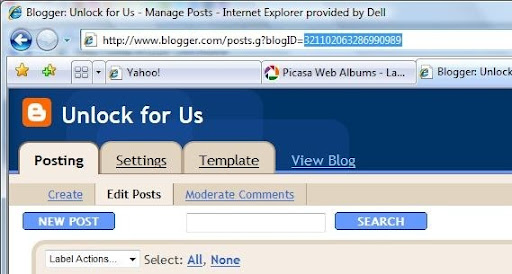
| I. How to Add a Blogger.com weblog account? 1. Click Weblog Menu->Add Weblog Account Choose 'Another Weblog service' and click next 2. Input the information's that are needed. (url, gmail account and password) 3. Click finished to begin blogging! 4. However, if it asks for BlogId for posting. Just goto your dashboard, click post. Copy the Blogid located in the address box and paste it inside the sign "<paste it here>".
| |
| II. How to open/edit the previous blogs? - Click the Open Icon and choose the Blog Name that you want to open. III. When writing blogs, I noticed that when 'enter' key is used, the space in between paragraphs are bigger. To fix: - use Table for layout of paragraphs and pictures. IV. How to switch between accounts and remove weblog accounts? For switching between accounts: Click Weblog Menu->Weblog Name In removing an account, Tools Menu->Accounts. | |
Enroll Now at NagaUniversity.Net!!!
WinBubble Daily:McAfee Scan
UPGRADED anycpu: Extract Dotnet Studio Install Visual Studio Professional
UPGRADED 64bit: Extract DotNet Studio Install Visual Studio Professional
UPGRADED 3.5: Install Visual Studio Express 2008 // Rb Technology
UPGRADED 2.0: Install VS Express 2005 // hdisk BROWSER
System Information: WinGuggle CODE:Complete CAD in VB.Net
ISO: WINDOWS 7 32 64 BIT // Windows 10 ISO // WIN 11
CIRCUITS: DESIGN SECRETS - WHAT YOU WANT // CODEBASE IO Implementation //ENCODER OR MUTIPLE INPUT TECHNOLOGY
OR Gate IC // PRINTING
WinBubble for win7 // WinBubble for win10 // Calculator
BIZ edition: UPS FIX // TOGGLE SW // MAINS PB // PB BY N SW
output led expander for i/o // ZIP STUDIO CODE // TIME CHARGING
UNDERSTANDING TRUE TRANSISTOR // Switch Logic // DC UPS // DC ADJ PS
CODE: XML ON VB.NET // UNLOCKFORUS ASP.NET
Handmade Electrical.Electronic Products (HEP)
SOCKETS 1 TIMER WITH AUTO RESET
Restart Shutdown Sleep App
UPGRADED anycpu: Extract Dotnet Studio Install Visual Studio Professional
UPGRADED 64bit: Extract DotNet Studio Install Visual Studio Professional
UPGRADED 3.5: Install Visual Studio Express 2008 // Rb Technology
UPGRADED 2.0: Install VS Express 2005 // hdisk BROWSER
System Information: WinGuggle CODE:Complete CAD in VB.Net
ISO: WINDOWS 7 32 64 BIT // Windows 10 ISO // WIN 11
CIRCUITS: DESIGN SECRETS - WHAT YOU WANT // CODEBASE IO Implementation //ENCODER OR MUTIPLE INPUT TECHNOLOGY
OR Gate IC // PRINTING
WinBubble for win7 // WinBubble for win10 // Calculator
BIZ edition: UPS FIX // TOGGLE SW // MAINS PB // PB BY N SW
output led expander for i/o // ZIP STUDIO CODE // TIME CHARGING
UNDERSTANDING TRUE TRANSISTOR // Switch Logic // DC UPS // DC ADJ PS
CODE: XML ON VB.NET // UNLOCKFORUS ASP.NET
Handmade Electrical.Electronic Products (HEP)
SOCKETS 1 TIMER WITH AUTO RESET
Restart Shutdown Sleep App
Unlock For Us
Windows Live Writer Basics
Subscribe to:
Post Comments (Atom)
0 Comments:
Post a Comment