Unlock For Us

How to Add Icons to Control Panel in Windows 7 and Vista (Folders, Programs or Applications)

controlpanel 


Did you ever wonder how mainstream manufacturers such as Intel and AMD add custom Control Panels Items for their hardware?


Using the newest version of WinBubble. Yes you can!

You can add any Programs, Applications and Folders to Control Panel in just few seconds.

Open the Tools Tab of the application, go to My Computer and Control Panel Group, and fill-up all the details.

Adding Folder to Control Panel

folder

Name   My Projects   (or any name that you want)

File/Folder   explorer c:\myfiles\2010\Projects

Tool Tip   Projects for this year

Icon   C:\Windows\system32\imageres.dll,68

Click the Set Option. That's it!

Adding Programs to Control Panel

programs

Read here for more details.

That’s it! Enjoy using WinBubbles!


Read more...

Unlock For Us

Yahoo Mail Account Hack! Detect if opened in another location

yahoohoo This is an emulation of the new feature of Gmail to provide an enterprise Bank-Style IP security for emails. My workaround hack provides real-time detection if opened in another location, anywhere in the world!

This is a very simple solution for protecting your email account from hack in another location using yahoo messenger or yahoo mail.

How to detect if your mail has been hack or used by another person

  • Set your yahoo mail to sign-in automatically to yahoo chat once you login.

mailym

  • ALWAYS sign-in to your yahoo messenger account and if another person hack your email account in another location. you’ll get this message.

ymmsg

“You have been signed out because you signed in on a different computer or device”

- means another person used your account

  • and vice-versa

msg

“You have been disconnected from chat because you have signed into Yahoo! Messenger from another computer or device.”

It’s just a very simple logic with the same results with Google mail security but in real-time.

But there’s a down side with this trick, If the person manages to click “cancel” very fast, the trick is useless.

I used this and surprisingly it works! One of my friends manage to get my password through a zip cracker in one of my files.

:) long time ago.

Anyhow, Hope this helps!


Read more...

Unlock For Us

How to Check the Processor Type, OS version and BIOS Information on Computer

systemlogo Need to retrieve, find or verify the most important System Information before buying the new laptop or Desktop Computer such as Processor, OS, Memory and BIOS Information?

What’s the quickest way and where?


Quick View of System Information

Click the Start Menu > Right-Click the Computer Link > Properties

computerproperties

It will display the most important information in your computer.

System

There are some workarounds to manipulate these data and the store that you’ll buy these computer can change the Computer specifications and other information. Now, Using third-party software is recommended to get the latest and correct Information of the computer.


Using WinGuggle to get the System Information

The new version of WinGuggle provides plenty of information to analyze numerous aspects of your computer. Open the System Summary Tab and Double Click the System Information Icon.

winguggle

Once the System Summary Window is open, you’ll see the latest and detailed Information of your PC.

OS version

If your a computer geek and you want the most detailed information in your Registry. Here’s the complete Registry Key Location of these System Information's that you want to retrieve.

Using Windows Registry

HKEY_LOCAL_MACHINE\HARDWARE\DESCRIPTION\System

  • SystemBiosDate
  • SystemBiosVersion
  • VideoBiosDate
  • VideoBiosVersion

HKEY_LOCAL_MACHINE\HARDWARE\DESCRIPTION\System\BIOS

  • BIOSReleaseDate
  • BIOSVendor
  • BIOSVersion
  • BaseBoardManufacturer
  • BaseBoardProduct

HKEY_LOCAL_MACHINE\HARDWARE\DESCRIPTION\System\CentralProcessor\1

HKEY_LOCAL_MACHINE\HARDWARE\DESCRIPTION\System\CentralProcessor\0

  • ProcessorNameString
  • VendorIdentifier
  • ~MHz (use the decimal value)
  • Identifier

Hope this helps!


Read more...

Where’s the “Open in New Tab” and “Window” for the New Youtube.com Site

newtabnewwindow


With the revamp version of Youtube website, there are many changes that aims to increase the interaction of the users to the system.

At first, you’ll be having some difficulty adjusting and you might say it’s not good but after one-two days of using the new website.

You will say that the changes are nice and you’ll find more hidden great videos.

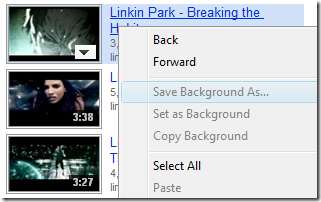
One User came to me, “I like the new website but the problem is…. When I used the Right-Click option in the Mouse, I can’t see the Open in New Tab and New Window! Is this a Bug?”

rightclicknewtabdoesntexist

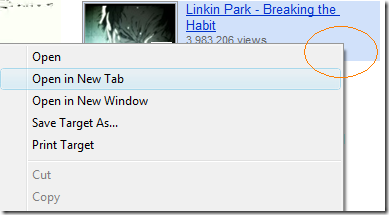
Solution: Right-Click ANY position at the vacant space beside the link.

location

Use the Picture instead of the Title Link

picturerightclick 

Note: Internet Explorer only. Works fine with Google Chrome, Firefox, and Opera.

Hope this helps!


Read more...

Unlock For Us

Add Right-Click Menu Entries to your Network Context Menu

Windows Vista

networkcontextmenuvita

Windows 7

ppnetwork

Some of the built-in network tools are really important in our daily geek computing. Most of these utilities are being used every day for troubleshooting, monitoring and checking.

Putting them to your Networking context menu will speed up everything in just two clicks!

Windows Vista

Open the program WinBubbles and go to Tools Menu, Click the Network option and Add these sample Network Right Click Menu Items.

Endless Ping of Yahoo.com – the option will send a ping command for maintaining your networking connections while on the road. Very Useful for 3G connections…

Name:  Endless Ping of Yahoo.com  (or any name that you want)

Command:   cmd /k ping yahoo.com –t

Cool…. :)

Open my Ftp Server – this item will open your ftp sever using Windows Explorer.

Name:  Endless Ping of Yahoo.com  (or any name that you want)

Command:   c:\windows\explorer ftp://windowsforus.com

IP Configuration  - This option will instantly show the IP Configuration using the built-in command line tool in Windows.

Name:  IP Configuration  (or any name that you want)

Command:   "C:\Program Files\WinBubble\WinBubble 2\Tools\AdminTools" -cmd ipconfig /all

Note: We’re using the Admin Tools in the new version of WinBubble to launch the command line interpreter as administrator or elevated process.

For Windows 7, you need to set first the permission before adding any context menu items.

How? Open regedit.exe and go to this Network registry path

HKEY_CLASSES_ROOT\CLSID\{F02C1A0D-BE21-4350-88B0-7367FC96EF3C}

Right-Click > Permissions…

pp

Click the Advance Option

ppadvance

Go to the Owner Tab > Click your account name > Check Replace owner on subcontainers and objects > Hit Apply to set the ownership of the Registry Key

ppownership

After setting the ownership, you can now set the Permission for your User-ID.
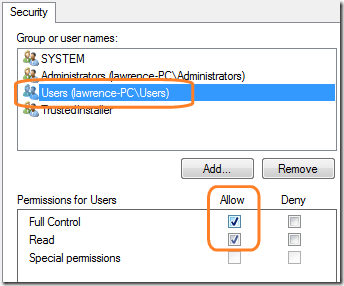
ppsettings

After Setting the Ownership and Permission of the Network Registry key, you can now open WinBubble for Windows 7 to Add the Context Menu Items.

Just use the Windows Vista guide above to easily add any context menu to your Network Icon in Windows 7.

That’s it! Customization Hack for Today!


Read more...

Unlock For Us

How to Refresh your Desktop without restarting Windows 7 and Vista

icon


Some of the useful features of WinBubbles are hidden under the hood.

This is one of the hidden tools that was designed to help users in some of the annoyances that you may encounter in daily use of Windows.

Such as:

  • Icons are not updating even if you press F5
  • Start Menu settings and desktop doesn’t update
  • You need to launch gpupdate /force to update group policies settings

The newest version of WinBubble will do that in just one command.

"[Folder Location of WinBubble]\Tools\AdminTools" –refresh

Read here for more details about the command line parameter


Creating a Keyboard Shortcut To Refresh your Start Menu, Taskbar, Desktop, Windows Explorer and Desktop

  • Right-Click > New > Shortcut

shortcutkeys

  • In this case I’m using the installed location of WinBubbles in Program Files Folder

"C:\Program Files\WinBubble\WinBubble 2\Tools\AdminTools" –refresh

  • Right-Click > Properties to add the Hot Key that you like to use in launching the command

properties

  • Add the Shortcut key that you want to use and Change the Icon.

changeiconshortcutkey

That’s it! HOPE THIS HELPS!


Read more...

How to Accept incoming Dial-up Connections in Windows 7 and Vista

network This is one of the best old features in Windows that everyone must know. Creating local area network between two computers in long distances using your Plain Old Telephone System (POTS) is so cool even if it’s an old stuff already.

Without Internet Charges and Its free….

You don’t have to buy your own server or another internet connection if you want to be able to “connect to home network” and access your LAN when you’re on the road.

Although it’s a little bit slow but it works! Useful of rural areas and emergency backup systems.

Configuring Windows 7 and Vista as a remote access server using your 56k modem (like Dial-up Internet Server) and VPN

newincomingconnection

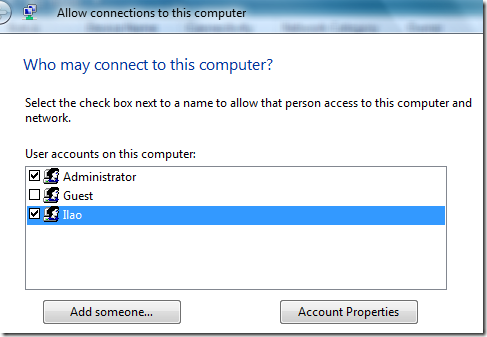
  • Select the allowed persons to access your remote computer

allowedusers

  • To setup a dial-up networking server, click to check ”Through a dial-up modem”.

A Virtual Private Network (VPN) is a network that connects one or more computers to a small, medium and large network such as a business network using the Internet. It is encrypted, so only authorized people have access to the system.

It is considered a network that is layered on top or within International Networks e.g. setting up two computer network via Internet.

  • To setup a VPN, check “Through the Internet” option.

vpn_dialup

Now, we have easily setup a VPN Server and a Dial-up Networking Server.

incomingconnections

For more beginner to advance hidden windows utilities in Windows 7 and Vista, Check out WinBubble, the newest version will help you to access these tools instantly.

Enjoy!


Read more...


© Unlock For Us @2026-2027| Blogger| License Agreement| Author| Contact Us