Enroll Now at NagaUniversity.Net!!! (UN ONLINE)

Unlock For Us

How to Disable Connection for Specific Wireless Networks

wireless 

If there are many password-enabled and unsecured wireless networks around your house, disabling specific Wireless Connection is very good topic.

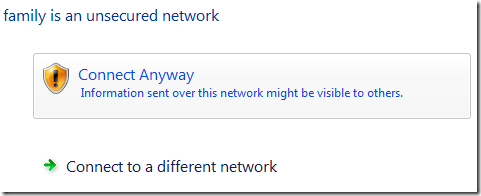
In this example, we will disable connecting to unsecured network called “family network”

How to Disable Specific Wireless Network

Connect first and save the network

connecting

success

Manage Wireless Networks that use Wireless Connection

Press Windows Key + R for Run Window and use the command below

explorer.exe shell:::{1fa9085f-25a2-489b-85d4-86326eedcd87}

Right-Click > Properties

properties

Click the Security Tab > Choose WEP as the Encryption

wep

Put any Network security key

wep2

windows3

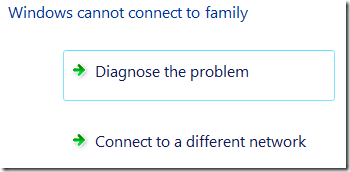
“Windows cannot connect to …”

That’s it!

Very easy and simple way to disable connection to specific wireless network in Windows 7 and Vista!


Read more...

Unlock For Us

Simple Way to Disable Startup Softwares

msconfig 

Sometimes we just wanted to disable one application and doesn’t want to think anymore. Probably your tired and busy with your work, this tip is good for you.

The new version of WinBubbles will help you in every day computing, making every task easier and faster.

optimizetab

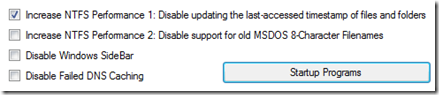
Open the program and go to Optimize Tab and just click the Startup Programs option to disable and enable programs during startup.

startup

Manually launching the System Configuration Utility

MSConfig is a utility to configure settings and disabling startup programs for security. Here’s the simple command line switch for the tool.

msconfig –4

Hope this helps!


Read more...

Unlock For Us

Using RegDevelop to create Customized Restrictions and Policies

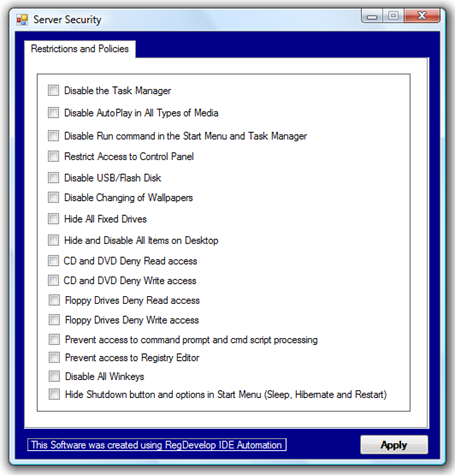
The great thing for the software regdevelop is that, it lets you customize and create your own security policies based on Windows Registry in just few minutes.

customizesecurityrestriction

Last month, I started studying all the users interaction and they appear to move in random everyday even if they don’t understand and know the system itself.

Trial and error is always one of our instinct one way or another.

Restrictions

If your using the home edition or other limited version of Windows, the only way you can add restriction is to use third-party tools to easily modify the registry.

Using RegDevelop to Create your own customized Security Policies

You can find the program here

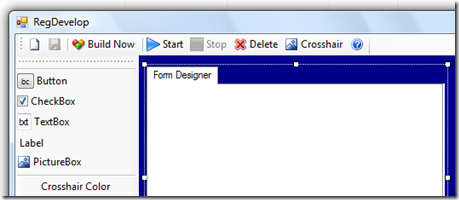
regdevelop

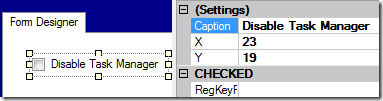
Drag the checkbox control and add caption

disabletaskmanager

Registry Location

HKEY_CURRENT_USER\Software\Microsoft\Windows\CurrentVersion\Policies\Explorer

Value Name DisableTaskmgr

Value 1

ValueType DWORD

References: http://technet.microsoft.com/en-us/library/cc962658.aspx

Disable Registry Editor

RegKeyPath1

HKEY_CURRENT_USER\SOFTWARE\Microsoft\Windows\CurrentVersion\Policies\System\

Value_Name1    DisableRegistryTools

ValueData1    1

ValueType1   DWORD

DeleteWhenUnchecked   True

Disable Changing of Wallpaper

RegKeyPath1

HKEY_CURRENT_USER\Software\Microsoft\Windows\CurrentVersion\Policies\ActiveDesktop

Value_Name1    NoChangingWallPaper

ValueData1    1

ValueType1   DWORD

DeleteWhenUnchecked   True

Disable USB Drive (reboot is needed)

RegKeyPath1

HKEY_LOCAL_MACHINE\SYSTEM\CurrentControlSet\Services\USBSTOR

Value_Name1    Start

ValueData1    4

ValueType1   DWORD

DeleteWhenUnchecked   False

RegKeyPath2

HKEY_LOCAL_MACHINE\SYSTEM\CurrentControlSet\Services\USBSTOR

Value_Name2    Start

ValueData2    3

ValueType2   DWORD

Disable Command Prompt

RegKeyPath1

HKEY_CURRENT_USER\Software\Policies\Microsoft\Windows\System

Value_Name1    DisableCmd

ValueData1    1

ValueType1   DWORD

DeleteWhenUnchecked   True

Disable Control Panel

RegKeyPath1

HKEY_LOCAL_MACHINE\SOFTWARE\Microsoft\Windows\CurrentVersion\Policies\Explorer

Value_Name1    NoControlPanel

ValueData1    1

ValueType1   DWORD

DeleteWhenUnchecked   True


If your an average user and you just want to add restrictions, try using WinBubble for Windows 7 and Vista… Simply choose the option and Click Apply to add restrictions.

Hope this Helps!


Read more...

Unlock For Us

How to Disable the Task Manager for Limited or Standard Accounts in Windows

regedit Last week, I was configuring my old installation of Windows XP when my entire facilities was hit by thunderstorms and some surge protections fails during that day. Lighting strikes near our house and luckily, only few of my computers was affected and $133 dollars worth of electronics equipment was damage.

But It costs two days of work and redesigning my equipments.

Anyway, unexpected moments happened and I’ll start all over again and dig more some topics regarding useful tips for everybody.

Manually Disable or Remove the Task Manager from the List for Limited Accounts

This security policy tip is very useful for schools, internet cafes, small business and shared computers at home.

From you Limited or Restricted User Account, Open your Windows Explorer > go to \Windows folder > regedit.exe > Right-Click and Choose “Run as…” option

runas

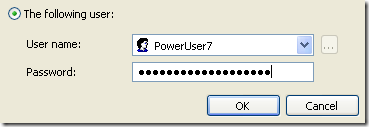
Open the program for accounts with administrative privilege

runaslogin

hkeyusers


In this example, I want to disable the Task Manager for the User Account named Sharedaccount.

Once the Registry editor is opened, we need to verify and find the corresponding SID folder for the account.


How to get the corresponding SID Folder for the Specific User Account

go to these registry location to get first the corresponding SID key for the User

HKEY_LOCAL_MACHINE\SOFTWARE\Microsoft\Windows NT\CurrentVersion\ProfileList

Find the corresponding SID by checking those folders for the Sharedaccount Value

S-1-5-21-825345543-318236825-1802669531-1003

CHECK THIS VALUE

ProfileImagePath

%SystemDrive%\Documents and Settings\Sharedaccount

Now, we have verified that the SID for the Sharedaccount user is S-1-5-21-825345543-318236825-1802669531-1003

  • Open this registry Location to restrict launching of task manager

HKEY_USERS\S-1-5-21-825345543-318236825-1802669531-1003\Software\Microsoft\Windows\CurrentVersion\Policies

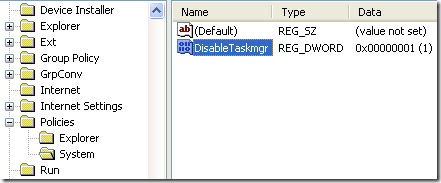
  • If System subfolder key doesn’t exists, create the folder and Right-Click the folder key > New > DWORD (32-bit) Value

disabletaskmgr

  • type DisableTaskmgr, double click and change the value to 1

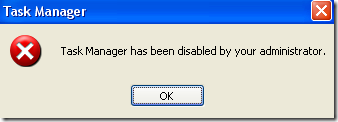
Try by pressing CTRL+ALT+DEL or CTRL+SHIFT+ESC

disabledtskmgr

“Task Manager has been disabled by your administrator”

Hope this Helps!


Read more...

Unlock For Us

RegDevelopTM, Control System using your Mobile Phone

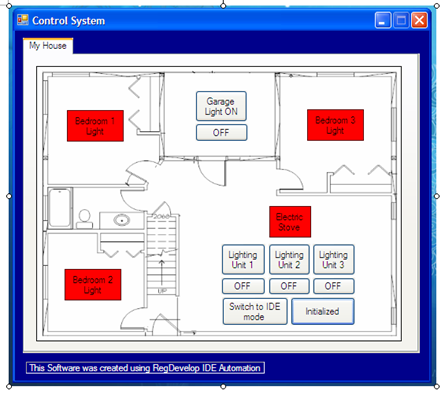
cssample

integrateddev

designsamples

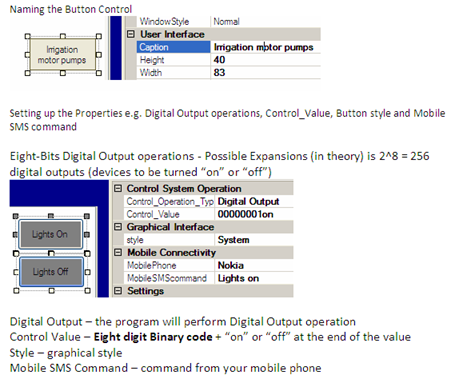
properties

Advantages

The software lets you create endless designs and possibilities that will suits in your needs from a very simple ones to complex input and output digital operations.

Useful Recommended Applications

  • In third-world countries, students living from other places and islands usually travel back to school located in the city to check their grades. This time, students can check their grades and other enrollment information using sms or text messages. Great for poor families.
  • You can design a system that will minimized all the operational cost of your business by lowering the power consumption by monitoring and turning off all the power if not in used.
  • Farmers can create their own system based on their needs especially those irrigation systems that needs to check on power supply and pump operation. They can design a system that can remove the need to travel long distances and it is updatable if there is an expansion being done.
  • Save energy by creating a system that lets you turn off devices inside the house if not in used – same way if the system will be used in Internet Cafe.
  • You can also design an application like one of the winner last year that allows users to text-message the quality-authentication code found on the packaging of anti-Malarial and other medications in order to guard against counterfeit drugs.
  • You can design an application that can reply inspirational messages or text messages regarding the Environment and inspired students to do more.
  • And many more designs in the future...

MAIN OBJECTIVE

Most of the great things today came from those very simple ideas – Anders Hejlsberg of Microsoft”

EARLY STAGES

I’m just trying to show that the idea can be done and used by any below average income earners up to rich families and businesses.

I already have the ideas in my notes during my 3rd year college projects in engineering and that is year 2002. The integrated development environment was based on my software called RegDevelop, designed to create applications in just few minutes without writing any code.

Need to rest for few days after two months of Work!

Please stay tuned! Hope I’ll win and I’m going to make sure that It will fund my study.

Thanks for reading the article!


Read more...

Unlock For Us

Integrated Development Environment for Control Systems using Mobile Phones

21052010005

UNIFIED CONCEPT IN CONTROL ENGINEERING

This is the unified concept that I’m planning to send to nokia as my entry for this years competition. The electronics stuff is very easy and can be done by any beginners, engineers, technicians and hobbyist.

I’m just trying to show that the idea can be done.

Unfortunately, I think I have no more time to develop dedicated applications for Nokia devices and Web Apps.

It will only work for SMS for now.

If I will win in this contest there is the possibility that I’m going to develop dedicated applications that can sync to WIFI enabled phones or Internet enabled phones and create a unified concept that can be used in desktop and in any kind of cellphones such as android devices, windows phone 7 (or windows mobile), iphone and other phones.

Although using SMS you can do that.

In Layman's Terms…

  • What if I wanted to control everything in my house? e.g. garage door, power outlets, lights and many devices using my phone.
  • What if I wanted to monitor all the temperatures, sensors and power in my house remotely?
  • What if I wanted to create all the projects that won last year in just few minutes? (very fast and it can be done by anyone)

Winners in Emerging Markets Category

New mobile solutions to improve the daily lives of millions in developing nations, focused on areas such as education, health data access, infotainment and agriculture.

- Grand Prize: Nano Ganesh (India) - This application allows farmers in India to establish remote contact with distant, modem-equipped electric irrigation pumps , to check on power supply and pump operation without the need to travel long distances .

- 1st Place: mPedigree (Ghana) - This application allows users to text-message at no cost a quality-authentication code found on the packaging of anti-Malarial and other medications to a provisioned mobile shortcode in order to guard against counterfeit drugs believed to be responsible for an alarming number of deaths, especially in the developing world.

- 2nd Place: DigitallCS (Digital Internal Control System) (Mexico) - With this application, agricultural co-ops can inspect the growing practices of their members and upload the data to a website for reporting and analysis in order to verify the growers’ adherence to standards that include Fair Trade Cerftified and Certified Organic.

MORE DEVELOPMENT

The project is in its very early stage and most of the things that I used like casing and parts was recycled and came from old switching devices for printers.

I’m also using reconditioned cheap Nokia 3100 to became part of the effort to recycle all the devices that we can used.

DEVELOPMENT PLATFORM

designer

I created the IDE for Rapid Development application showing that the concept can be done using mobile phones in just few minutes!


Hope I’ll win! Please stay tuned for more updates!


Read more...

Unlock For Us

Easiest way to edit any website

How to edit any website without using any 3rd party tools.

Just copy and paste this script to your address bar and edit mode will be activated.

javascript:document.designMode='on';document.body.contentEditable='true';void WinBubble;

tested on Google Chrome and IE!

Source(s) Thanks Google for the year 1999 cache of the code

Source 1

Source 2

Thanks!


Read more...


© Unlock For Us @2024| Blogger| License Agreement