Unlock For Us

Using NSLOOKUP command to get IP and DNS Information


dos3 Name Server Lookup or nslookup displays DNS information to test and troubleshoot DNS servers including IP address of a particular machine running in TCP/IP protocol.


Non-Interactive mode

C:\Windows\system32>nslookup /?
Usage:
   nslookup [-opt ...]         # interactive mode using default server
   nslookup [-opt ...] - server   # interactive mode using 'server'
   nslookup [-opt ...] host       # look up 'host' using default server
   nslookup [-opt ...] host server # look up 'host' using 'server'

common usage: nslookup [-option] [hostname] [server]

This is being use if you want for a single piece of information e.g. performing a reverse lookup on an IP address.

C:\Windows\system32>nslookup 72.14.203.121
Default Server:  sn3.dli.bit.net
Address:  201.4.2.9

Name:    tx-in-f121.1e100.net
Address:  72.14.203.121

C:\Windows\system32>nslookup unlockforus.blogspot.com

Default Server:  sn3.dli.bit.net
Address:  201.4.2.9

Non-authoritative answer:
Name:    blogspot.l.google.com
Address:  64.233.189.191
Aliases:  unlockforus.blogspot.com

C:\Windows\system32>nslookup you.wikidot.com

Default Server:  sn3.dli.bit.net
Address:  201.4.2.9

Non-authoritative answer:
Name:    www1.s.wikidot.com
Address:  74.86.234.149
Aliases:  you.wikidot.com


USING THE COMMAND TO TEST AND TROUBLSHOOT DNS SERVERS

Note: Before using this tool in interactive mode, you should be familiar with how DNS works.

Interactive mode

Simply type “nsloolup” and “?” to display all the available commands.

C:\Windows\system32>nslookup
Default Server:  sn3.dli.bit.net
Address:  201.4.2.9

> ?
Commands:   (identifiers are shown in uppercase, [] means optional)
NAME            - print info about the host/domain NAME using default server
NAME1 NAME2     - as above, but use NAME2 as server
help or ?       - print info on common commands

set OPTION      - set an option
    all                 - print options, current server and host
    [no]debug           - print debugging information
    [no]d2              - print exhaustive debugging information
    [no]defname         - append domain name to each query
    [no]recurse         - ask for recursive answer to query
    [no]search          - use domain search list
    [no]vc              - always use a virtual circuit
    domain=NAME         - set default domain name to NAME
    srchlist=N1[/N2/.../N6] - set domain to N1 and search list to N1,N2, etc.
    root=NAME           - set root server to NAME
    retry=X             - set number of retries to X
    timeout=X           - set initial time-out interval to X seconds
    type=X              - set query type (ex. A, AAAA, A+AAAA, ANY, CNAME, MX, NS, PTR, SOA, SRV)
    querytype=X         - same as type
    class=X             - set query class (ex. IN (Internet), ANY)
    [no]msxfr           - use MS fast zone transfer
    ixfrver=X      - current version to use in IXFR transfer request
server NAME     - set default server to NAME,                       using current default server
lserver NAME    - set default server to NAME, using initial server
finger [USER]   - finger the optional NAME at the current default host
root            - set current default server to the root
ls [opt] DOMAIN [> FILE] - list addresses in DOMAIN (optional: output to FILE)
    -a          -  list canonical names and aliases
    -d          -  list all records
    -t TYPE     -  list records of the given RFC record type (ex. A,CNAME,MX,NS,
PTR etc.)
view FILE           - sort an 'ls' output file and view it with pg
exit            - exit the program

You can read for more information about the tool: HERE


Error Messages from Microsoft Windows XP Article

Descriptions

Timed out
The server did not respond to a request after a certain amount of time and retries. You can set the time-out period with the set timeout subcommand retries with the set retry sub command.

No response from server
No DNS name server is running on the server computer.

No records
The DNS name server doesn’t have resource records of the current query type for the computer, although the computer name is valid. The query type is specified with the set querytype command.

Nonexistent domain
The DNS domain name doesn’t exist.

Connection refused or Network is unreachable
The connection to the DNSname server or fingerserver could not be made. This error commonly occurs with ls and finger requests.

Server failure
The DNS nameserver found an internal inconsistency in its database and could not return a valid answer.

Refused
The DNS server refused to service the request.

Format error
The DNSname server found that the request packet was not in the proper format. It may indicate anerror in nslookup.

Source

Have Fun Learning!


Read more...

Unlock For Us

Using GetMAC Tool to display MAC address for Network Adapters

dos3 Media Access Control (MAC) address is the computer’s physical address inside the network. This tool will help you to configure your router(s) to allow only specific computers to access the network or internet. Thanks to William for asking this question last December 16, 2009.

If your computer has more than one network adapter, the MAC address of each adapter is listed separately.

Using the tool to display the network adapters mac address

D:\>getmac

Physical Address    Transport Name
=================================================
00-19-8B-DB-69-1D   \Device\Tcpip_{793CAA85-159E-4EC7-9986-FD793610261B}
00-1B-76-2D-B1-DE   Media disconnected

D:\>

Other Parameters of the tool

D:\>getmac /?

GETMAC [/S system [/U username [/P [password]]]] [/FO format] [/NH] [/V]

Description:
    This tool enables an administrator to display the MAC address
    for network adapters on a system.

Parameter List:
    /S     system        Specifies the remote system to connect to.

    /U     [domain\]user  Specifies the user context under
                             which the command should execute.

    /P     [password]   Specifies the password for the given
                             user context. Prompts for input if omitted.

    /FO    format        Specifies the format in which the output
                             is to be displayed.
                             Valid values: "TABLE", "LIST", "CSV".

    /NH                      Specifies that the "Column Header" should
                               not be displayed in the output.
                               Valid only for TABLE and CSV formats.

    /V                       Specifies that verbose output is displayed.

    /?                       Displays this help message.

Examples:
    GETMAC /?
    GETMAC /FO csv
    GETMAC /S system /NH /V
    GETMAC /S system /U user
    GETMAC /S system /U domain\user /P password /FO list /V
    GETMAC /S system /U domain\user /P password /FO table /NH

D:\>

Anyhow, if your a windows fan and you don’t like the name, you can still use another network tool called ipconfig to get the network adapters physical address (alternative name to mac address)

C:\>ipconfig /all

Ethernet adapter Local Area Connection:

   Connection-specific DNS Suffix  . :
   Description . . . . . .  : Broadcom NetXtreme 57xx Gigabit Controller
   Physical Address. . . . . . . . . : 00-19-8B-DB-69-1D
   DHCP Enabled. . . . . . . . . . . : Yes
   Autoconfiguration Enabled .  . : Yes


Hope this helps!


Read more...

Unlock For Us

Display the Last Logon Time for Users in Windows 7, XP and Vista

Query User Utility can display the current users idle and logon time. Net.exe is a command line tool since Windows 95 and 98 is proven to be useful in many ways that offers a light weight functions to network via DOS command line.

Windows7Tools

Net.exe can also be use to display the last login time for Administrators, Power Users and other users.

Using the new version of WinBubble

 lastastlogontime

WinBubble incorporates tons of small features into one design for simplicity.

You don’t need to memorize and its safe. Open WinBubble, go to Specific Tab and Click the User Accounts CP Button. Once the Window opens, push the user information.

Works with Windows 7 and Vista!


Geek Way

Alright, your a good computer user and of course, knowledge is better. Open the Command Prompt and use the syntax below.

Net User [Username]


That’s it!

Enjoy!


Read more...

Unlock For Us

How to keep your Internet connection to stop disconnecting after a few hours

This is a problem for people with mobile internet connections. People that is always on the road.

Reply from 69.197.117.221: bytes=32 time=493ms TTL=51
Reply from 69.197.117.221: bytes=32 time=491ms TTL=51
Reply from 69.197.117.221: bytes=32 time=498ms TTL=51
Reply from 69.197.117.221: bytes=32 time=488ms TTL=51

Make it stay connected even if your internet connection is slow and moving from one place to another.

Click the  Start Menu, key in “cmd”, press enter and use the syntax below.

ping yahoo.com –t

Reply from 69.197.117.221: bytes=32 time=517ms TTL=51
Reply from 69.197.117.221: bytes=32 time=546ms TTL=51
Reply from 69.197.117.221: bytes=32 time=521ms TTL=51
Reply from 69.197.117.221: bytes=32 time=524ms TTL=51
Reply from 69.197.117.221: bytes=32 time=523ms TTL=51
Reply from 69.197.117.221: bytes=32 time=562ms TTL=51
Reply from 69.197.117.221: bytes=32 time=527ms TTL=51
Reply from 69.197.117.221: bytes=32 time=539ms TTL=51
Reply from 69.197.117.221: bytes=32 time=599ms TTL=51
Reply from 69.197.117.221: bytes=32 time=519ms TTL=51
Reply from 69.197.117.221: bytes=32 time=529ms TTL=51

Very useful…. Great for dial-up modems!

Enjoy! :)


Read more...

Unlock For Us

All folders are gone in USB flash Drives

According to AVG only 3% of today’s security problems are caused by ‘traditional’ viruses and in my experience, most of them are using the older version of Windows.

 attrib

Ok, many Windows users asked me several weeks ago how in the world their files are missing in just few minutes. After examining the flash disk, I found out worms are responsible for hiding the files and it self propagates through autorun.inf again.

During that day I remembered the good old useful article in vista.

How to Show all hidden Folders

Be sure that you have scanned and cleaned all the virus in your drive first and proceed with the How to guide below.

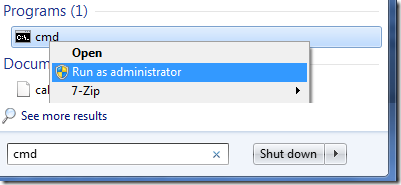
Open the command prompt as administrator

cmdadmin

Once it opens, go to your usb drive (in my case drive g)and launch the attrib command as shown below:

g:                                                   and press enter

attrib -h -s -r -a * /s /d                    

stillhidden

              ok

The parameters will depend on the worm virus that infected your system so I included all of them.

That’s it! Hope this helps!


Read more...

Unlock For Us

NASA STS-129 Rendezvous Pitch Maneuver

 rendezvous


Hobaugh will maneuver Atlantis through a back flip rotation to expose the heat shield when Atlantis is about 600 feet from the station. The photos will be transmitted to mission control for checking and evaluation to determine whether the heat shield sustained any damaged and problems during launch.

If your one of the NASA fans you can save the video directly.

STS-129 Booster Camera Video

http://anon.nasa-global.edgesuite.net/anon.nasa-global/ccvideos/sts-129_srb.asx

You can click the link above but it is recommended to copy and paste the url directly in Windows Media Player by pressing CTRL+u.

Enjoy!


Read more...

Unlock For Us

NASA LCROSS Mission: Shooting to the Moon

According to NASA the LCROSS mission was designed to search for water on the moon. The LCROSS mission is going to accomplish this by sending a rocket into the moon causing a huge blast and impact creating a crater, throwing tons of potentially water ice and vapor above the lunar surface.

lcross

To get a  better idea about the project download and watch the mission overview here:

http://lcross.arc.nasa.gov/audio/MissionOverview-HQversions.web.mov

Youtube: NASA LCROSS IMPACT

http://www.youtube.com/watch?v=mVyEOFfv_lo

Tips and Tricks

How To get the live feed and streaming video from NASA:

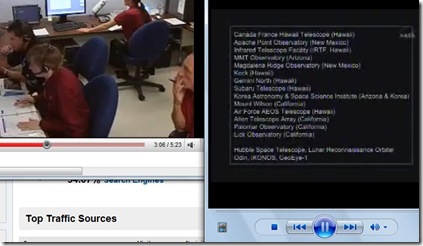
Open your Windows Media Player and press CTR+u

livefeed

Paste the link below:

http://mfile.akamai.com/18566/wmv/etouchsyst2.download.akamai.com/18355/wm.nasa-global/LCROSS/LCROSS_Lunar_Impact.asx

NASA Public Channel

http://playlist.yahoo.com/makeplaylist.dll?id=1369080&segment=149773

Have Fun!


Read more...


© Unlock For Us @2024| Blogger| License Agreement