Context Menu are right click options or popup menus that offers choices of action needed by the user. Here’s how to get into tweaking and installation of those options through RegDevelop and Windows Registry.

Created program using Regdevelop (Complete)
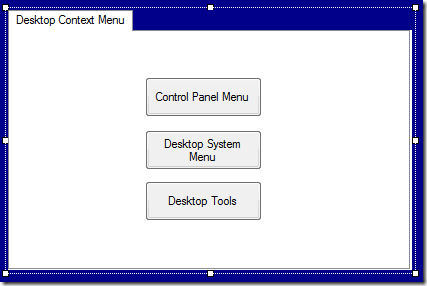
Regdevelop let’s you create a graphical user interface for these tweaks, Click here to download the complete version of the tool for easy installation of Right-Click Menus.
Update(s): with uninstall options
1/25/2012: Click here to download the latest version (with Switch to Integrated Development Environment)
New! 9/1/2012: (Click here) Added Computer Icon Right-Click Menus
You can learn and see how it is being done through highlighted words and folder key location and registry values.
Open your notepad, copy and paste the text below, save it as [filename].reg, and make sure you select All Files (*.*)
Double-Click the file to install in Windows Registry.
Method #1 – Control Panel Menu (3 SubMenu only)
| Windows Registry Editor Version 5.00 [HKEY_CLASSES_ROOT\DesktopBackground\Shell\Control] "MUIVerb"="Control Panel" "icon"="control.exe,0" "SubCommands"="EaseOfAccessCenter;SystemProperties;Calculator" [HKEY_LOCAL_MACHINE\SOFTWARE\Microsoft\Windows\CurrentVersion\Explorer\CommandStore\shell\EaseOfAccessCenter] @="Ease of Access Center" "icon"="c:\\windows\\system32\\utilman.exe,0" [HKEY_LOCAL_MACHINE\SOFTWARE\Microsoft\Windows\CurrentVersion\Explorer\CommandStore\shell\EaseOfAccessCenter\command] @="control access.cpl" [HKEY_LOCAL_MACHINE\SOFTWARE\Microsoft\Windows\CurrentVersion\Explorer\CommandStore\shell\SystemProperties] @="System Properties" "icon"="sysdm.cpl,0" [HKEY_LOCAL_MACHINE\SOFTWARE\Microsoft\Windows\CurrentVersion\Explorer\CommandStore\shell\SystemProperties\command] @="control sysdm.cpl" [HKEY_LOCAL_MACHINE\SOFTWARE\Microsoft\Windows\CurrentVersion\Explorer\CommandStore\shell\Calculator] @="Calculator" "icon"="calc.exe" [HKEY_LOCAL_MACHINE\SOFTWARE\Microsoft\Windows\CurrentVersion\Explorer\CommandStore\shell\Calculator\command] @="calc.exe" |
Method #2 – Softwares and System Tools Menu (3 Sub-Menu only)
| Windows Registry Editor Version 5.00 [HKEY_CLASSES_ROOT\DesktopBackground\Shell\System] "MUIVerb"="System Tools" "icon"="C:\\Windows\\system32\\wucltux.dll" "ExtendedSubCommandsKey"="DesktopBackground\\ContextMenus\\system" [HKEY_CLASSES_ROOT\DesktopBackground\ContextMenus\system] [HKEY_CLASSES_ROOT\DesktopBackground\ContextMenus\system\shell] [HKEY_CLASSES_ROOT\DesktopBackground\ContextMenus\system\shell\cmd1] "icon"="%windir%\\system32\\charmap.exe,0" "MUIVerb"="Character Map" [HKEY_CLASSES_ROOT\DesktopBackground\ContextMenus\system\shell\cmd1\command] @="charmap.exe" [HKEY_CLASSES_ROOT\DesktopBackground\ContextMenus\system\shell\cmd2] "icon"="control.exe,0" "MUIVerb"="Control Panel" [HKEY_CLASSES_ROOT\DesktopBackground\ContextMenus\system\shell\cmd2\command] @="control.exe" [HKEY_CLASSES_ROOT\DesktopBackground\ContextMenus\system\shell\cmd3] "icon"="%windir%\\system32\\cleanmgr.exe,0" "MUIVerb"="Disk Cleanup" [HKEY_CLASSES_ROOT\DesktopBackground\ContextMenus\system\shell\cmd3\command] @="cleanmgr.exe" [HKEY_CLASSES_ROOT\DesktopBackground\Shell\Softo] "MUIVerb"="Softwares" "ExtendedSubCommandsKey"="DesktopBackground\\ContextMenus\\tools" "icon"="C:\\Windows\\system32\\wucltux.dll,7" [HKEY_CLASSES_ROOT\DesktopBackground\ContextMenus\tools] [HKEY_CLASSES_ROOT\DesktopBackground\ContextMenus\tools\Shell] [HKEY_CLASSES_ROOT\DesktopBackground\ContextMenus\tools\Shell\cmd1] "MUIVerb"="Bluetooth File Transfer" "icon"="%SystemRoot%\\system32\\fsquirt.exe,0" [HKEY_CLASSES_ROOT\DesktopBackground\ContextMenus\tools\Shell\cmd1\command] @="fsquirt.exe" [HKEY_CLASSES_ROOT\DesktopBackground\ContextMenus\tools\Shell\cmd2] "MUIVerb"="Calculator" "icon"="calc.exe,0" [HKEY_CLASSES_ROOT\DesktopBackground\ContextMenus\tools\Shell\cmd2\command] @="calc.exe" [HKEY_CLASSES_ROOT\DesktopBackground\ContextMenus\tools\Shell\cmd3] "MUIVerb"="Command Prompt" "icon"="%windir%\\system32\\cmd.exe,0" [HKEY_CLASSES_ROOT\DesktopBackground\ContextMenus\tools\Shell\cmd3\command] @="cmd.exe" |
Method #3 – Computer Icon right-click Menu entries
| [HKEY_CURRENT_USER\Software\Microsoft\Windows\CurrentVersion\Explorer\HideDesktopIcons\NewStartPanel] "{20D04FE0-3AEA-1069-A2D8-08002B30309D}"="0" [HKEY_CLASSES_ROOT\CLSID\{20D04FE0-3AEA-1069-A2D8-08002B30309D}\shell\Hibernate] "icon"="C:\\Windows\\system32\\imageres.dll,27" [HKEY_CLASSES_ROOT\CLSID\{20D04FE0-3AEA-1069-A2D8-08002B30309D}\shell\Hibernate\command] @="rundll32.exe Powrprof.dll,SetSuspendState Hibernate" [HKEY_CLASSES_ROOT\CLSID\{20D04FE0-3AEA-1069-A2D8-08002B30309D}\shell\Lock] "icon"="C:\\Windows\\system32\\imageres.dll,54" [HKEY_CLASSES_ROOT\CLSID\{20D04FE0-3AEA-1069-A2D8-08002B30309D}\shell\Lock\command] @="Rundll32.exe user32.dll LockWorkStation" [HKEY_CLASSES_ROOT\CLSID\{20D04FE0-3AEA-1069-A2D8-08002B30309D}\shell\Restart] "icon"="C:\\Windows\\system32\\imageres.dll,95" [HKEY_CLASSES_ROOT\CLSID\{20D04FE0-3AEA-1069-A2D8-08002B30309D}\shell\Restart\command] @="Shutdown.exe -r -t 00" [HKEY_CLASSES_ROOT\CLSID\{20D04FE0-3AEA-1069-A2D8-08002B30309D}\shell\Shutdown] "icon"="C:\\Windows\\system32\\shell32.dll,137" [HKEY_CLASSES_ROOT\CLSID\{20D04FE0-3AEA-1069-A2D8-08002B30309D}\shell\Shutdown\command] @="Shutdown.exe -s -t 00" [HKEY_CLASSES_ROOT\CLSID\{20D04FE0-3AEA-1069-A2D8-08002B30309D}\shell\Sleep] "icon"="C:\\Windows\\system32\\imageres.dll,192" [HKEY_CLASSES_ROOT\CLSID\{20D04FE0-3AEA-1069-A2D8-08002B30309D}\shell\Sleep\command] @="Rundll32.exe Powrprof.dll,SetSuspendState Sleep" [HKEY_CLASSES_ROOT\CLSID\{20D04FE0-3AEA-1069-A2D8-08002B30309D}\shell\Switch user] "icon"="C:\\Windows\\system32\\imageres.dll,83" [HKEY_CLASSES_ROOT\CLSID\{20D04FE0-3AEA-1069-A2D8-08002B30309D}\shell\Switch user\command] @="tsdiscon.exe" |
For more advanced option… you can dig more by going to regdevelop folders and see the complete commands and registry values.

Works with Windows 7 and above…
Enjoy!
References
http://msdn.microsoft.com/en-us/library/bb761870(v=VS.85).aspx
http://io-repo.blogspot.com/2011/05/cascading-context-menus-via-static.html
http://msdn.microsoft.com/en-us/library/windows/desktop/hh127431(v=vs.85).aspx
http://www.askvg.com/add-cascading-menus-for-your-favorite-programs-in-windows-7-desktop-context-menu/
Works with Windows 7 and above…
Enjoy!
References
http://io-repo.blogspot.com/2011/05/cascading-context-menus-via-static.html
http://msdn.microsoft.com/en-us/library/windows/desktop/hh127431(v=vs.85).aspx
http://www.askvg.com/add-cascading-menus-for-your-favorite-programs-in-windows-7-desktop-context-menu/
1 Comment:
You can enhance desktop context menus using Regdevelop and manual registry edits, while exploring vivetool references for deeper customization.
These tweaks work great on Windows 7 and above, especially when paired with vivetool references for advanced feature enablement.
Post a Comment