This technology monitors AC and DC Lines for Generators, Solars, UPS and other Power Sources using AC/DC converters. Hardware is easy and simple but the Software is advanced.

Read more...
This technology monitors AC and DC Lines for Generators, Solars, UPS and other Power Sources using AC/DC converters. Hardware is easy and simple but the Software is advanced.
As Windows 11 starts, its very important to see the software after the computer restarts. How to set it automatically opening?
Classic way to do so is to put the application shortcut to Windows Startup Folder and Registry.
Press Win + R, type Shell:Startup
You'll notice that Windows Explorer will open:
C:\Users\[Username]\AppData\Roaming\Microsoft\Windows\Start Menu\Programs\Startup
There are lots of new features to Windows but we always want the good old functions to be working well. Anyway Stay tuned for more Tips regarding Windows.
Thanks!
Source: https://support.microsoft.com/en-us/windows/add-an-app-to-run-automatically-at-startup-in-windows-10-150da165-dcd9-7230-517b-cf3c295d89dd
Hurt everywhere and War. Music visitors now are very low according to my stats at Scourworld.com Music. The society seems to divert their attentions to work and finding new ways to get things done rightly.
Unlock For Us is still commited to upgrading the site slowly and publishing applications everyday using our very own Notepad Coder using .Net Framework 6.0.
Lets Invent and create newer Music and Data Television.
For the next comming weeks, Unlock For Us shall continue our work and innovation for both hardware and software. We'll be promising you lots of work done for our better future.
Thanks!
Computer Scientists, Teachers and Engineers -- Welcome to the world of done by hand. Notepad Coder lets you master coding. The very first 64-bit compiler functionality now at Notepad Coder IDE.
Its just notepad don't worry.


Using Notepad Coder IDE for .Net Framework 6.0
Recommended for newer computers: Windows 10/11 64-Bit version only.
ENJOY LEARNING!
Having difficulty checking your network connection, some computers seems to have LAN cable connection but no internet. What to do to check if LAN or WAN is the problem?
* Scans for routers inside the network and logically massively says WIRES are OK
* For checking of wires, equivalent for Ping Command
* Ability to check your own ip without going to the command prompt
- More Network Statistics
- Ping Usability inside the program

THANKS!
Storage devices are now getting smaller and cheaper nowadays. Its becoming our primary hardware to save data and later use them for work. Now on uRelay design, heres the new technology that lets you upgrade old laptop and PC hard disk.
MemIn Technology - this device is very suitable for hard disk design because even if you accidentally fall or throw the hardisk, its alright.
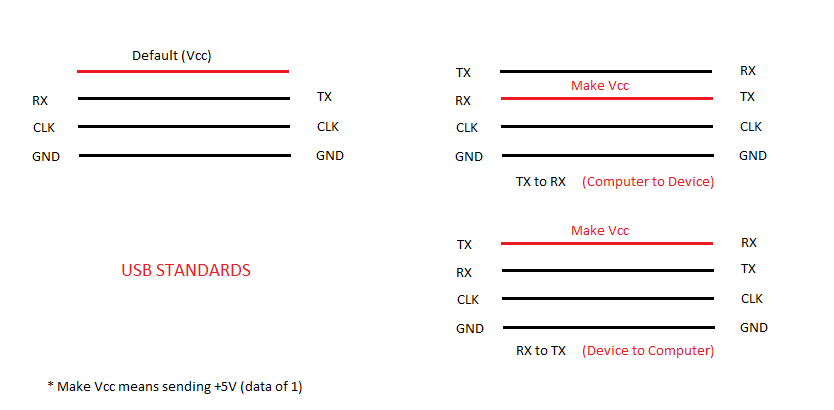
USB Technology - This explains why we have only 4 wires at USB interface and cables.
MORE
System Unit: Processing, Memory and Storage: here
That's it!
You can't find and access network configuration in Windows 11. Going to the Control Panel Window is difficult unless you knew the command prompt syntax. Heres how.
1. Press Win + R
2. type control ncpa.cpl
That's it!